- Released
- Type
- Update
Latest
Threat.Zone 3.9.5
Clearer verdicts and email analysis
API changes
Breaking
- A mail file (for example
.emlor.msg) that you submit throughPOST /,submissions/ sandbox POST /,submissions/ static POST /,v2/ submissions/ sandbox POST /orv2/ submissions/ static POST /is now stored the same way as in the web app, so the mail now gets email analysis. Inv2/ submissions/ cdr GET /, the mail now has thesubmissions/ {uuid}/ artifacts typeemail_filein place ofsample, and its attachments have thetypeemail_attachmentin place ofcompressed_file_entry. The files inside an archive attachment staycompressed_file_entry. A client that finds the submitted mail bytype == "sample"must also acceptemail_file. Mails submitted before this change keep their stored types, also when they are analyzed again. The artifacttypefield in the indicators response can now also have the valuesemail_file,email_attachmentandembedded_file. tierofGET /andsubmissions/ {uuid}/ verdict dynamicVerdict.tierofGET /,submissions/ {uuid} GET /andsubmissions/ {uuid}/ summary GET /now saysubmissions/ {uuid}/ indicators Unknownin place ofNot Measuredfor a behaviour run that could not rate the sample, for example a program that crashed at start. This is the same word as the submissionlevelunknown. Reports stored before this change also returnUnknown, and the HTML, PDF and STIX 2.1 exports now showWhy Unknown:.
Behavior
GET /,submissions/ {uuid}/ download/ yara-rule GET /andsubmissions/ {uuid}/ artifacts/ {artifactId}/ yara-rule GET /now return rule text whosev2/ submissions/ {uuid}/ download/ yara-rule referencemeta field holds the link of the submission in place ofDefault reference. A rule that one submission reuses from another gets the link of the submission that you download from. A rule generated before this release keepsDefault reference. When a file has too little data, you now get a clear message in place of a rule.autoSelectEnvironmentofPOST /,submissions/ sandbox POST /andsubmissions/ {uuid}/ artifacts/ {artifactId}/ analyze POST /now defaults tosubmissions/ url_download true. When you send noenvironment, the API now selects the sandbox environment from the file type, for example Linux for an ELF file and Android for an APK file. For an archive, the API uses the type of the entrypoint file. To keep the default environment of your plan, sendautoSelectEnvironment=false. The open-in-browser submission keeps the defaultfalse, and the v2 routes have no such field.GET /andsubmissions/ {uuid}/ network/ endpoints GET /no longer give a reverse-DNS name as a host that the sample contacted. When the sample used only the IP address, the endpointsubmissions/ {uuid}/ network/ endpoints/ {host}/ flows keyis now that address. A DNS flow is now keyed to the address of the DNS resolver, not to the name that the sample requested. The host IoCs of the submission follow the same rule. This also applies to reports stored before this change, except older reports that did not store the reverse-DNS name apart from the host name; those keep their hosts as before.GET /no longer lists the finished YARA scan, configuration extraction, IoC extraction, YARA rule generation, dynamic analysis and URL analysis jobs of an artifact 90 days after they end. The static analysis, CDR, signature check and email analysis jobs stay in the list. A client that reads the jobs of an older artifact must accept a shorter list.submissions/ {uuid}/ artifacts/ {artifactId}/ jobs
Important changes
- When you submit a file again more than 90 days after its last analysis, the analysis engines now analyze it again in place of reusing the old results. Finished engine jobs are now removed 90 days after they end. Static analysis, CDR, signature check and email analysis jobs are kept.
- A sample that the sandbox could not measure no longer looks clean. When a dynamic analysis ends with an error, the submission now gets the verdict Unknown in place of Benign, unless another analysis rates it Suspicious or Malicious. A dynamic analysis that did not start because of a setting or file that you can fix keeps the verdict of the other analyses. An unreachable VPN server or an archive that cannot be opened also gives Unknown.
Static analysis
Fewer static scans fail, and CDR reports no longer show a broken download link. Static analysis now tries a scan again when the scan engine stops unexpectedly, files with very long names now get full results, and CDR reports now always include the sanitized file or show a failure state.
YARA results on documents now separate real malware from generic findings, so a malware match is a stronger signal. Feature and hunting rules for documents now report in Suspicious categories or in the new informational capability category, not as malware. Rules for Windows PE files and scripts that were filed as document malware now report as dropper, loader, downloader or stealer, and duplicate document rules are removed.
YARA matches of the benign category no longer look like a clean verdict. The YARA results of the report now label them Informational in place of Benign.
Email analysis now separates real authentication failures from changes made after delivery. Each mail gets at most one authentication finding: Forged Email Authentication Header, Email Failed Authentication at Delivery, Email Authentication Anomaly Detected, or the new informational Email Authentication Could Not Be Re-verified. The last one is for example for a changed copy, an Outlook .msg file, an expired signature, a forwarded mail or a DNS error. An SPF or DKIM failure no longer counts when DMARC passed. The Email Authentication tab now shows this finding in place of the Authentication Mismatch Detected table.
Generated YARA rules are now the same each time for the same file, and they match their own sample more often. The rule name now comes from the SHA-256 of the file, and the reference meta field now holds the link of the submission. A new flag meta field warns when 80% or more of the rule strings also occur in benign files. When a file has too little data, you now get a clear message in place of a rule.
Configuration extraction now unpacks Android APK files about 6 times faster and with up to 2.4 times less memory, and it can now unpack more Coper dropper samples. An APK file now gets up to 60 seconds to unpack, in place of 15 seconds.
Dynamic analysis and sandbox
When a dynamic analysis does not start because of a problem you can fix, such as a VPN login that the server rejects or a file type that cannot run on the selected operating system, the report now tells you why. When you save a network configuration whose OpenVPN profile needs a username and password but has none, the page now warns you.
You can now see which CPU architecture each operating system runs before you start an analysis. The operating system picker shows the architecture (x64, x86 or ARM) with an icon and a label, and the analysis settings, the Pricing page and the submission list show it beside each operating system.
The Source column of the artifacts table in a dynamic analysis report is now easier to read, so you can see at a glance which process wrote each file. Each source process now shows only once, with its name and PID, also when it wrote more than one copy of the file, and the entries no longer get squeezed in the column.
Dynamic analyses now use every available sandbox and keep going when one sandbox fails. When several sandboxes of the same type are available, analyses take turns across them or go to the least busy one, one failing sandbox no longer takes every analysis or stops the queue, and the work of a sandbox that is down moves to another sandbox.
The Dynamic Scan Summary now labels a dynamic analysis that could not rate the sample Unknown, the same word as the submission verdict, in place of Not Measured. Reports made before this release also show the Unknown label, but their stored summary sentence can still say Not Measured.
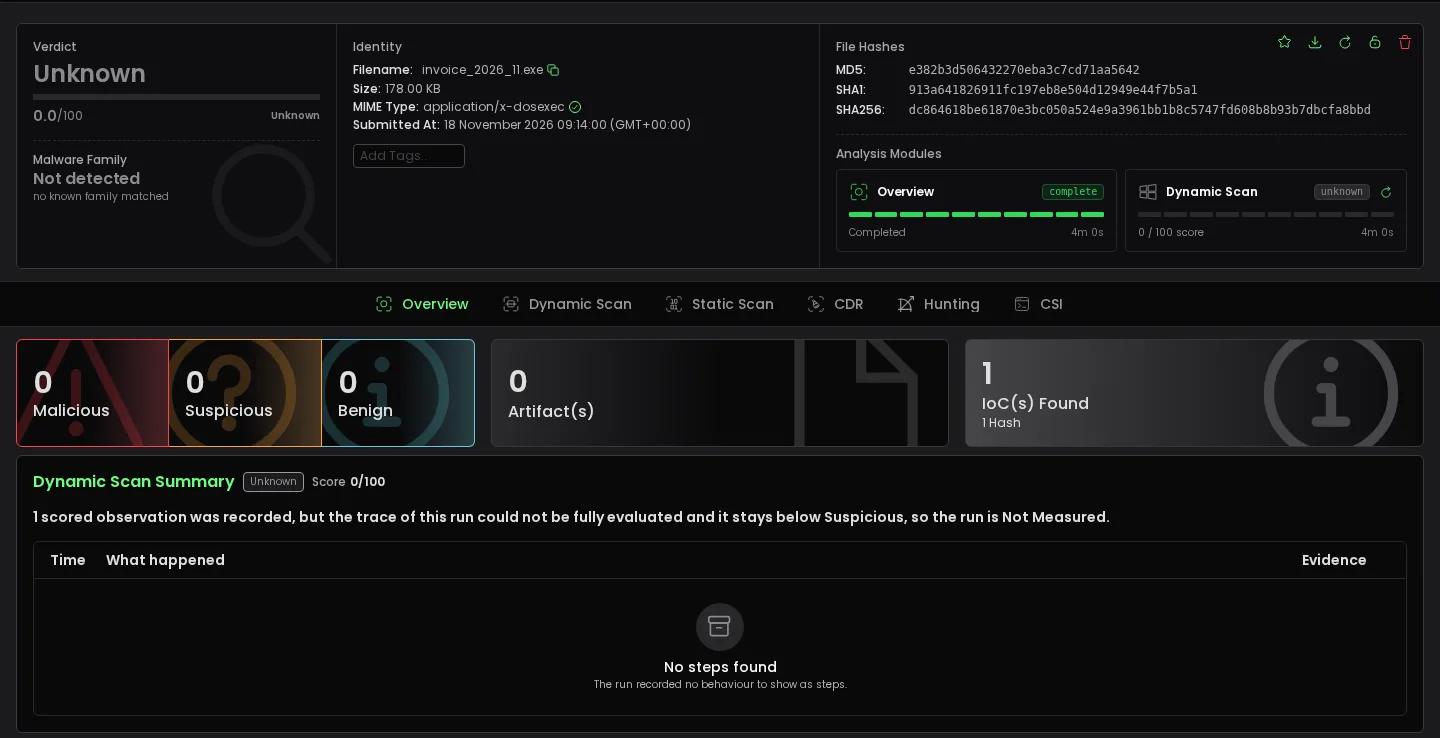
The report overview now shows Unknown for a dynamic run whose trace could not be fully evaluated, in the verdict, scan summary and analysis module status. Potentially unwanted programs and hacking tools are now easy to spot in your results. When the sandbox finds grey-ware behaviour, such as a game cheat, a keygen, a prank or an adware bundle, at a Suspicious or Malicious score, the submission now gets the
pua_hacktooltag.Dynamic analyses now end with an error less often when many analyses run at the same time, and analyses that record a large amount of data now finish. When a sample contacts more than 500 addresses, the network report shows the rDNS name and ASN for the 500 addresses with the most connections, and shows the country for the others.
URL analysis
A redirect chain that leads to a malicious page can now end Malicious, also when it starts at a well-known address. URL analysis now links each threat intelligence match to the redirect step that produced it, so you can see which step of the chain caused the match.
The URL info card is now easier to read at a glance. The verdict icon now scales with the height of the card, up to the size of the icon on the file card, and the module count next to Analysis Modules is removed.
Reports and exports
In the Downloads panel, you can now try again after a load error and start more than one download at a time. A safety notice opens after you download a sample. Sample and artifact downloads now show the archive password each time a download starts.
You no longer see a sample read Benign for minutes and then turn Malicious. While the analysis engines still run, the submission report now shows Analyzing in place of Benign or Unknown, also while the files that the sample dropped wait for analysis. The final verdict shows when the analysis ends, and a Suspicious or Malicious result shows at once.
You can now jump from a report section straight to what the AI report says about it. An AI icon beside the section title opens the matching section of the AI report. The icon shows when your plan includes the AI report and the AI report is ready.
IoCs and threat intel
IoCs and network reports no longer show a reverse-DNS name as a host that the sample contacted. The report shows the address and gives the name as an "rDNS" hint. A DNS flow now shows the DNS resolver as its destination and the requested name as "query: <name>".
Public API and SDK
You can now review the public API changes since release 3.7.5 in one place. The API changelog has a new 3.9.5 section that also lists the API changes of releases 3.7.5 to 3.9.4, and the API documentation now shows API version 3.9.5.
The Python SDK 1.3.0 supports all fields and parameters of Public API version 3.9.5.
auto_select_environment=Falsenow turns off automatic environment selection. The annotation methods now show a deprecation warning, because the API no longer supports them.A new
dynamicSkippedfield tells you when dynamic analysis was skipped because your plan has no environment for the platform of the file. The field is in the create responses ofPOST /,submissions/ sandbox POST /,submissions/ static POST /,submissions/ {uuid}/ artifacts/ {artifactId}/ analyze POST /(submit mode),submissions/ url_download POST /andv2/ submissions/ sandbox POST /, and inv2/ submissions/ static GET /andsubmissions/ {uuid} GET /. Its value isv2/ submissions/ {uuid} null, or an object withreason(no_environment_in_plan),platformand, when only one CPU type fits the file,architecture.Your integration can now tell users why a dynamic analysis did not start and what to fix.
GET /,submissions GET /andsubmissions/ {uuid} GET /now returnsubmissions/ search/ sha256/ {sha256} reports[].declineReasonwith acodeand atextwhen a dynamic analysis did not start because of a problem that you can fix, for example an OpenVPN profile without a username and password.codeis one ofvpn_credentials_missing,vpn_auth_rejected,vpn_profile_invalid,vpn_unreachable,sample_too_large,sample_unsupported,archive_unreadable,timeout_out_of_rangeandstart_arguments_rejected. In all other cases the value isnull.The API documentation now shows how to link each decisive reason of a verdict to its indicator row. It describes the
indicatorIdfield of eachnarrative.decisive[]row ofGET /, which holds thesubmissions/ {uuid}/ verdict idof the matching row ofGET /. Its value issubmissions/ {uuid}/ indicators nullwhen no single indicator row stands for the decisive row, for example when several indicator rows share its detection, or for the combined weight of several behaviours or a network request. Use it in place of the deprecatednarrative.decisive[].source.
Platform, accounts and admin
You now always know which file you submit. The File Analysis and CDR upload areas accept one file at a time and show the warning "Upload one file at a time." when you drop more than one file. Before, only the first file uploaded and the other files were dropped without notice.
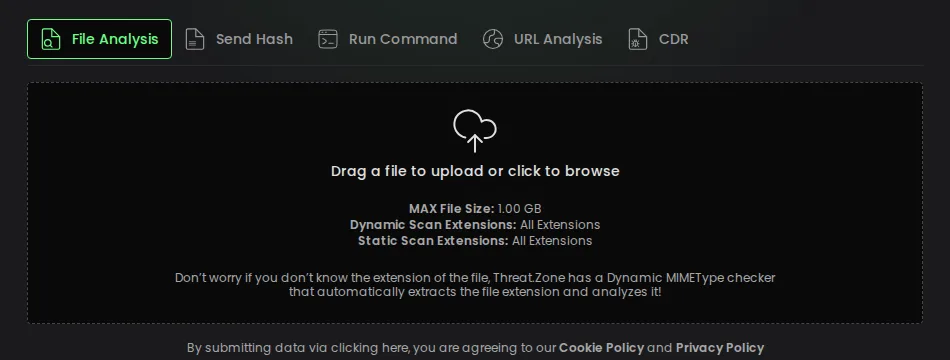
The File Analysis upload area accepts one file per upload, so you drag or browse a single file to start a submission. Archive uploads are now faster and keep every file in the archive. The upload status now shows how many files are stored while the archive finishes.
Performance
Report exports, downloads and API report reads now load faster, and so do the submission counts of the public submissions page. The submission counts of the public, workspace and favourite submission pages now refresh every 30 seconds, in place of every 5 seconds.
Analysis engines now work more reliably under heavy load, because a slow engine no longer gets duplicate copies of the same job.